KrutiDev Keyboard Layout Chart (Free Download)
The krutidev keyboard uses a non-Unicode Remington key layout, meaning keys map to visual Hindi symbols instead of universal codes. Study our mapping chart below, download the high-resolution layout chart (PNG), and learn typing rules.
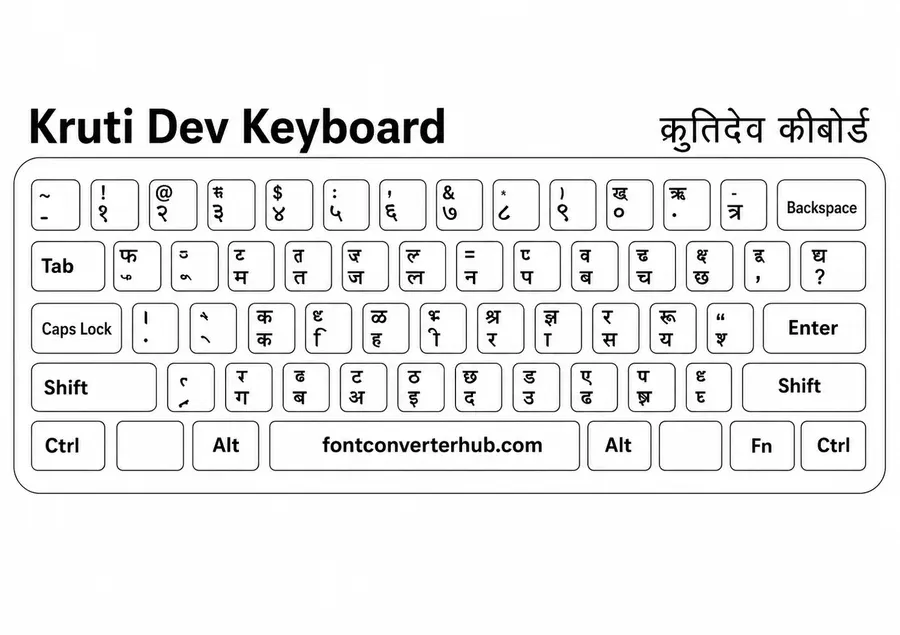
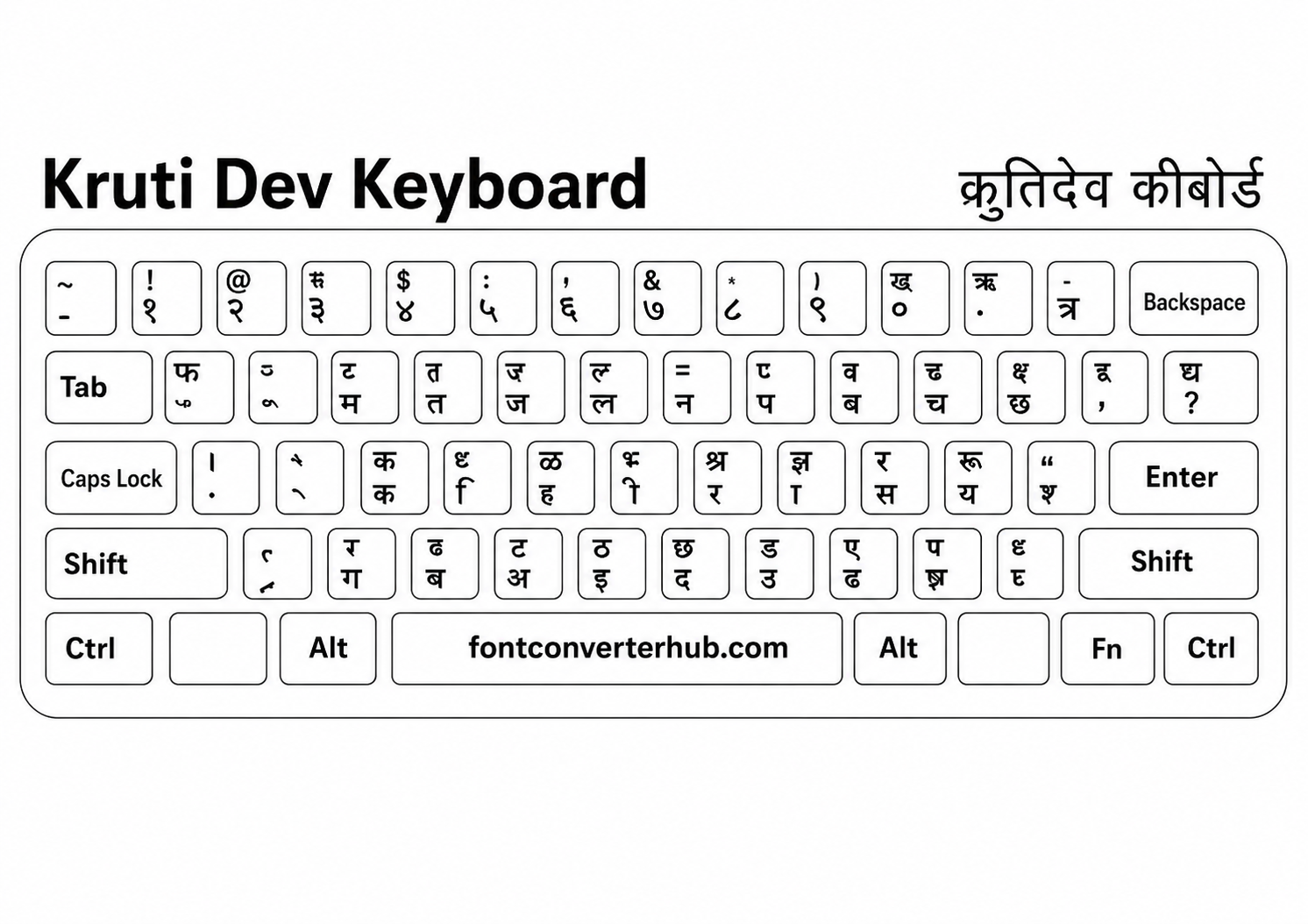
What is the KrutiDev Keyboard Used For?
The krutidev font keyboard maps Devanagari script glyphs onto English (QWERTY) keyboard layouts. It mimics traditional Indian Remington typewriters, which typists used for decades. This layout is the mandatory standard for:
- Government Exams: Speed typing tests conducted by SSC CGL, CHSL, Railways, police forces, and state public service commissions (PSCs) require candidates to type using KrutiDev 010.
- Judiciary and Law: Court transcripts, briefs, and official legal papers typed in Hindi are frequently typed in KrutiDev.
- Desktop Publishing (DTP): Local books, newspapers, and printing houses rely on this mapping for offline typing in MS Word, PageMaker, and InDesign.
Once you've typed or received KrutiDev text, convert it to modern Unicode using our KrutiDev to Unicode converter, or convert it to Mangal font for government portals.
KrutiDev Keyboard Layout for Marathi Typing
Because Marathi uses the same Devanagari script layout as Hindi, the KrutiDev key mapping is identical. Pressing keys maps to the same Devanagari base characters and vowel matras in both languages. Typing instructors in Maharashtra frequently utilize "krutidev keyboard marathi" layout charts to train students for local government clerical positions.
How to Type in KrutiDev (Basic Rules)
Since KrutiDev maps visual glyphs to standard keys, typing is not phonetic. For example:
- Pressing
dtypes the base letter क. - Pressing
kmaps to the vowel sign ा. - Pressing
fmaps to the chhoti-ee sign ि.
To practice typing in KrutiDev:
- Download the font file onto your system (install it for all users).
- Restart your word processor (like Microsoft Word or Excel).
- Select "Kruti Dev 010" as the active font.
- Keep our layout chart open on your screen (or print it out) to refer to key assignments.
- Practice typing common letter clusters and shifts to build muscle memory.
Don't have the font yet? Download the KrutiDev font first, then come back to practice with this layout chart.
KrutiDev 010 vs Other Variants
While 010 is the dominant version, several other variations exist. Spacings and line weights differ slightly:
| Variant | Keyboard Layout Details | Optimal Application |
|---|---|---|
| Kruti Dev 010 | Standard typewriter Remington layout. | Government typing exams, court papers, and standard practice. |
| Kruti Dev 011 | Identical mapping to 010; slightly condensed character spacing. | Book printing and news publishing where narrow margins are needed. |
| Kruti Dev 055 | Identical mapping; features minor adjustments to spacing and punctuation. | Form printing and custom design headers. |
Need the font too? Download KrutiDev font here
To view or edit documents using this layout offline, you must have the font file installed on your system. Without it, your typing will render in unreadable English characters.
Frequently Asked Questions
What is the KrutiDev keyboard used for?
The KrutiDev keyboard is used for typing Hindi and Marathi text in Devanagari script using a standard English QWERTY keyboard. It is the primary layout required for government typing exams and legal documentation in India.
Is the KrutiDev keyboard free to use?
Yes. The KrutiDev keyboard layout chart and font are completely free to view, download, and use for typing practice, examinations, and commercial work.
How do I practice KrutiDev typing?
Download the KrutiDev keyboard chart from this page to use as a reference. You can practice using online typing tests or offline typing tutor software (like Sony Typing Tutor or JR Typing Tutor) with sample Hindi paragraphs.
Is KrutiDev still used today?
Yes. Even though Unicode fonts (like Mangal) are the modern digital standard for websites and mobile phones, KrutiDev remains the mandatory typing layout for many typing speed tests, state government exams, and court record systems.
What is KrutiDev 010 Hindi typing keyboard?
KrutiDev 010 is the standard and most popular variant of the KrutiDev font family. The typing layout is based on the Remington typewriter mapping, where each key represents a specific Hindi character visual glyph.
Which keyboard is best for Hindi typing?
For general internet use, email, and mobile messaging, Unicode keyboards (like Google Indic Keyboard or Inscript layout) are best. However, for government typing exams, KrutiDev layout is the standard and must be learned.
Related Converters
Krutidev to Unicode Converter
Convert Krutidev 010 text to Unicode instantly. Fast, private and browser-based.
Unicode to Krutidev Converter
Convert Devanagari Unicode text to Krutidev instantly. Fast, private and browser-based.
Chanakya to Unicode Converter
SoonConvert legacy Chanakya visual font characters to standard Unicode.
KrutiDev to Mangal Converter
Convert KrutiDev text to Mangal Unicode font online, free and instantly. Paste your KrutiDev text and get properly formatted Mangal/Unicode Hindi text in seconds.
Mangal to KrutiDev Converter
Convert Mangal Unicode Hindi text to KrutiDev 010 font online, free and instantly. Paste your Mangal text and get KrutiDev-formatted output ready for government forms, print, and typing exams.
Krutidev to Chanakya Converter
Convert Krutidev 010 Hindi text to Chanakya font online, free and instantly.
Chanakya to Krutidev Converter
Convert Chanakya Hindi text to Krutidev 010 font online, free and instantly.
Preeti to Unicode Converter
Convert Preeti font Nepali text to Unicode (Devanagari) online — free, instant, and browser-based.
Unicode to Preeti Font Converter
Convert Unicode Nepali text to Preeti font encoding online. Free, instant, browser-based. Perfect for legacy Nepali DTP, newspapers, and government document workflows.
DevLys to Unicode Converter
Convert DevLys font text to Unicode Devanagari Hindi instantly. Free, online, and browser-based.
Unicode to DevLys Font Converter
Convert Unicode Devanagari Hindi text to DevLys font encoding. Free and instant.
Nepali Unicode Converter
GuideComprehensive guide to Nepali Unicode standard, legacy fonts, Kalimati, and online conversion tools.